If your Samsung Galaxy falls in water, turn it off. Do not connect it to a charger, and bring it to a repair shop on the same day. At Gia Hue Mobile in Hanoi, drying a wet Samsung phone is free. This includes the Galaxy S series, the Galaxy A series, the Galaxy Note series, the Galaxy Z Flip and the Galaxy Z Fold.
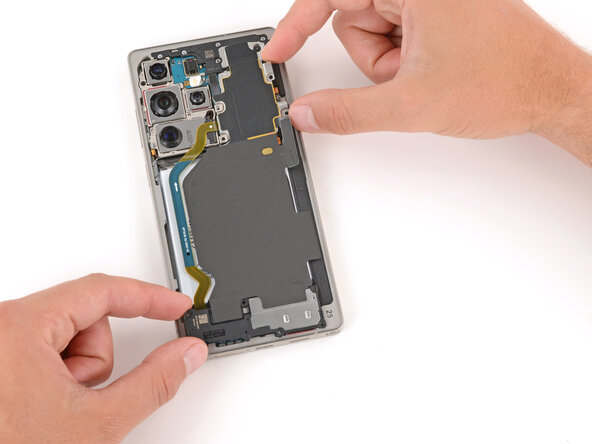
This article explains the first steps, the meaning of the “Moisture detected” warning, and which Galaxy models have the highest risk.
Message us on WhatsApp with a photo of the wet Samsung phone. Our technician will explain the next steps for your Galaxy.
💬 WhatsApp +84 962 528 528
What should you do first?
- Turn off the phone. Press and hold the side key and the volume down key. Then tap Power off.
- Do not charge the phone. Do not use a cable or a wireless charger.
- Remove the case, the SIM tray and the microSD card if your model has a microSD card.
- Remove the S Pen from a Galaxy S Ultra or a Galaxy Note. Water often stays inside the S Pen slot.
- Turn the phone so that the USB-C port points to the floor. Shake it gently one or two times. Then dry the outside with a soft cloth.
- Keep the Samsung phone switched off, and place it in a dry room with moving air. Do not use a hair dryer, and do not use rice.
- Visit one of our shops with the phone before the end of the day. Come as soon as possible after contact with salt water, pool water or a drink.
What does “Moisture has been detected” mean?
When you connect a Galaxy phone to a charger, the phone checks the USB-C port. If the phone finds water, it shows a blue water drop and a message: “Moisture has been detected.” The phone stops cable charging until the port is dry.
This warning protects your phone. Do not try different cables or chargers to avoid the warning. Keep the phone turned off and let the port dry. If the message remains after several hours, or if it appears every time, water is probably inside the phone. In this case, the phone needs a professional check and drying.
Sometimes this warning appears on a phone that was not in water. Sweat, high humidity or dirt in the port can also cause it. We can clean the port during the free check.
Which Galaxy models have the highest risk?
- Galaxy S series (Galaxy S7 and newer): These phones have an IP68 rating. However, salt water, chlorine and age can still allow water to enter.
- Galaxy A series: Mid-range models, such as the Galaxy A5x models, usually have an IP67 rating. Many low-cost Galaxy A models have no water rating.
- Galaxy Z Flip and Galaxy Z Fold: These phones resist water, but they have little protection against dust and sand. The hinge is the weakest part after a trip to the beach.
- Any Samsung phone with cracked back glass or a previous repair: The original factory seal may be damaged.
To find your model, open Settings and tap About phone. You can also send us a photo of the phone.
Why can a wet Samsung phone stop working several days later?
Water is not the main problem. After the water dries, salt and minerals remain on the board. These deposits slowly cause corrosion on the connectors. Look for these signs:
- Green lines, purple lines, spots or dark areas appear on the AMOLED screen.
- The “Moisture detected” message does not disappear.
- Fog appears inside the camera lenses.
- The speaker sound is weak, or the microphone stops working.
- The phone becomes warm, the battery drains fast, or the screen restarts without a reason.
Free Samsung drying at Gia Hue Mobile
We dry all Samsung Galaxy phones for free at both of our shops in Hanoi. This is our process:
- Free check: We open the phone and check the board, the battery, the screen connector and the charging port.
- Deep drying: We put the phone in a drying chamber. The chamber removes moisture from inside the phone, not only from the surface.
- Ultrasonic cleaning: An ultrasonic bath removes salt and minerals from the wet contacts. As a result, corrosion stops at an early stage.
- Safe testing: Before the phone is switched on, the technician checks the screen, the battery and the main board.
- No obligation: A Samsung phone that works again after the drying costs you nothing.
If a part is already damaged, such as the charging port, the battery or the screen, we tell you the price before we start. A Galaxy repair usually needs 30 to 60 minutes. Your warranty lasts 3 to 12 months, and we link the warranty to your phone number. Read our Warranty Policy.
Are you visiting Hanoi? If you have a flight soon, tell us the time, and your phone goes to the front of the queue. Our team reads English messages on WhatsApp, so please write to us before your visit. Pick the branch that is nearer to your hotel.
Frequently asked questions
Can I use a wireless charger when my Samsung phone shows “Moisture detected”?
Samsung allows wireless charging in this situation. However, if the phone fell in water, do not charge it until a technician checks it.
Does the Samsung warranty cover water damage?
Usually, no. The manufacturer warranty usually does not cover liquid damage. This is also true for phones with an IP68 rating.
Can you dry a Galaxy Z Flip or a Galaxy Z Fold?
Yes. A foldable phone needs extra care around the hinge and the inner screen. Please bring it to our shop quickly.
Is the drying really free?
Yes. The check and the drying are free. You pay only if a part needs replacement, and only after you approve the price.
Visit our shops
Gia Hue Mobile – Thanh Xuan
177 Vu Tong Phan Street, Khuong Trung Ward, Thanh Xuan District, Hanoi
Gia Hue Mobile – Dong Da
22 Thai Ha Street, Trung Liet Ward, Dong Da District, Hanoi
WhatsApp / Zalo: +84 962 528 528
Phone: +84 986 980 802
Email: lienhe@giahuemobile.com
⭐ 922 Google reviews
Message us on WhatsApp with a photo of the wet Samsung phone. A member of our team usually answers within a few minutes.
💬 WhatsApp +84 962 528 528
Related pages: Free Phone Drying Service · Samsung Repair